
5 Pro Navimow Install Tips Everyone Should Know
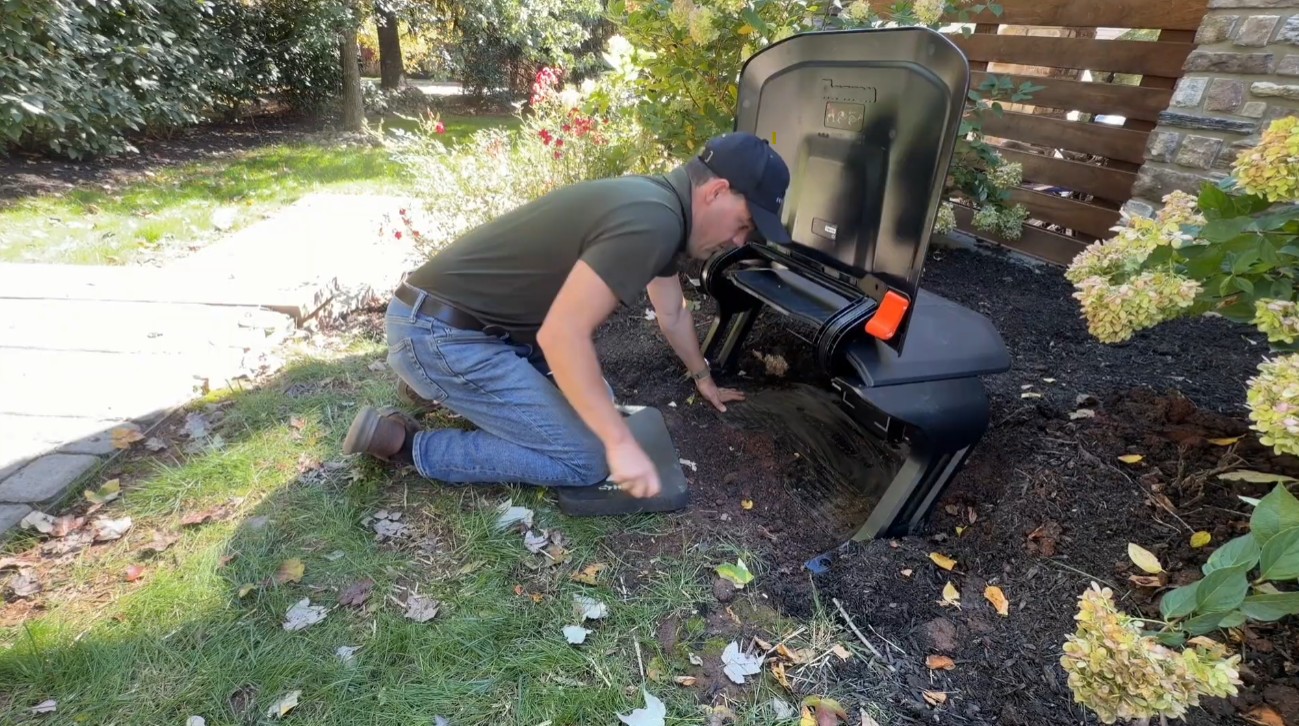
A Navimow X430 can handle a complicated lawn, but only if it’s installed with care.
I just finished an install in Phoenixville, PA with over a dozen no-go zones, a driveway in the way, a charging station tucked into a big mulch bed, and about two bars of AT&T, which meant the RTK antenna had to go up on the house. The homeowner cares how everything looks, and the mower now has a name. Meet Mufasa.
Here are the five pro tips I used, picked up over a full season of Navimow installs as an authorized dealer. The video above walks through each one, and this post covers the details so you can come back to them later.
Tip 1: Put the power supply in a weatherproof enclosure
The charging station’s power supply is the part of a Navimow install most people leave exposed. On this job, it sits inside an outdoor enclosure box next to the house, with the cables running through sealed grommets. We now do this on every customer install that calls for it.
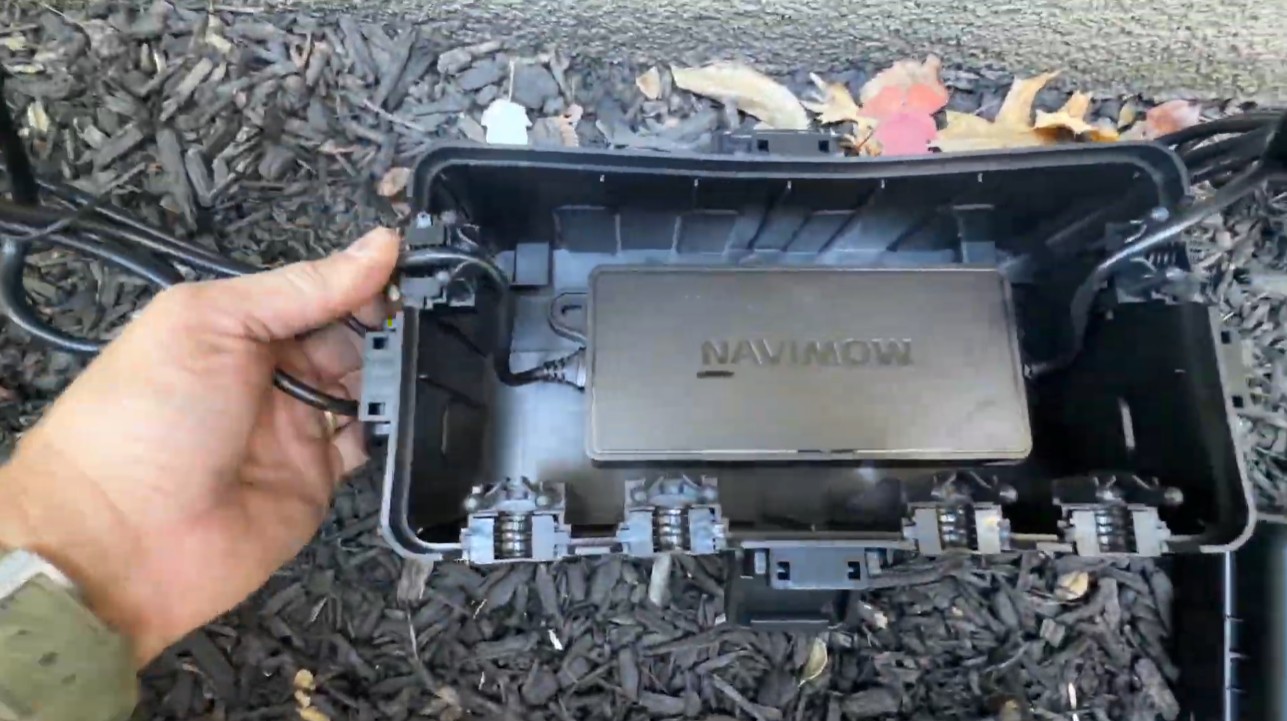
The enclosure does two jobs:
- Protection. It keeps rain, mulch, sprinklers and string trimmers off the power supply all season.
- Easy winterization. You do want to bring the power supply in for the winter. The power supply has screw holes for wall mounting, but a box is faster: unclip the lid, unplug, carry it inside. Nothing to unscrew or dig up. The buried extension cable stays outside. That’s what its weatherproof caps are for: close them up for the winter and the cable is fine where it is. (The rest of the end-of-season routine is in how to winterize a robot mower.)
It’s a little extra expense, and we think it’s worth it. The mower garage goes over the charging station to keep sun, leaves and rain off the mower between runs, and to keep the birds off it in fall and spring. Together they make the home base look finished instead of like a pile of equipment in the flower bed. Where the station itself should go is its own decision: where to put your Navimow charging station covers it.
Bonus: A custom name tag for your mower
Every mower we install can get a custom nameplate: a genuine Navimow camera housing with your mower’s name UV-printed on it, so it’s permanent. It’s a small touch, but a mower with a name is more fun to own, and it’s easy to tell apart from the neighbor’s. Mufasa is the first mower I’ve installed with one.
You can design your own for the Navimow X4 series (X430 and X450) or Terranox in the Name Tag Builder. The finished plate is $120, fitted at your install or shipped to swap on yourself. Everything about the nameplate.
Tip 2: Mount the RTK antenna above the roofline
The RTK antenna gives the X430 its centimeter-level positioning, so it needs a clear view of the sky: about 120 degrees of blue sky, with nothing in the way. (Navimow’s own guidance calls for an open cone of more than 110 degrees above the antenna head.) Look at this property and you see why that’s hard: trees on every side. The only place with that much sky was above the lip of the roof.
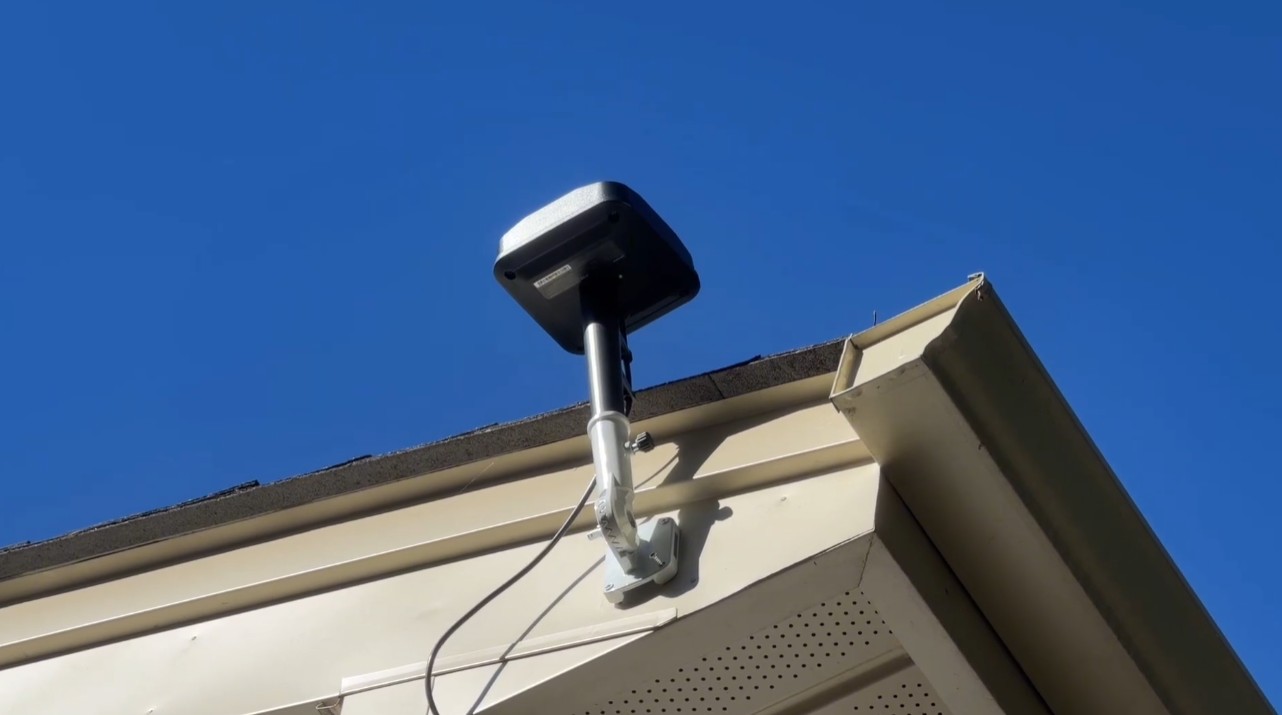
So the antenna went on a wall mount screwed to the fascia, high enough that the head sits above the roof. We use a white mount on a house with light trim and a black one on a darker home, so it blends in. The cable runs down the siding, into the ground, and across to the charging station in its mulch-bed nook on an RTK extension cable. Most visitors will never notice any of it. A pole in the middle of the yard works too, but it’s an eyesore and one more thing to mow around. Where to install a robot mower RTK antenna goes deeper on picking the spot.
How far does it reach? Navimow rates each antenna for about a 200-meter radius, roughly 600 feet, with a clear line of sight. Through trees, subtract about half. The link is a 900 MHz-band radio sending real-time corrections down to the mower, and that low frequency is why it gets through foliage at all. On this lawn the far side is only about 75 feet from the antenna, through a line of trees, and the mower’s light is blue out there. Blue means the connection is good. (We measured the clear-sky range on a Paoli install.)
Then switch it on. This is the step a lot of people forget. A Navimow ships on NetRTK, pulling corrections over the internet, and it keeps using NetRTK until you tell it otherwise. Mounting the antenna isn’t enough. You have to go into the app’s Advanced features and switch the mower over to the local antenna.
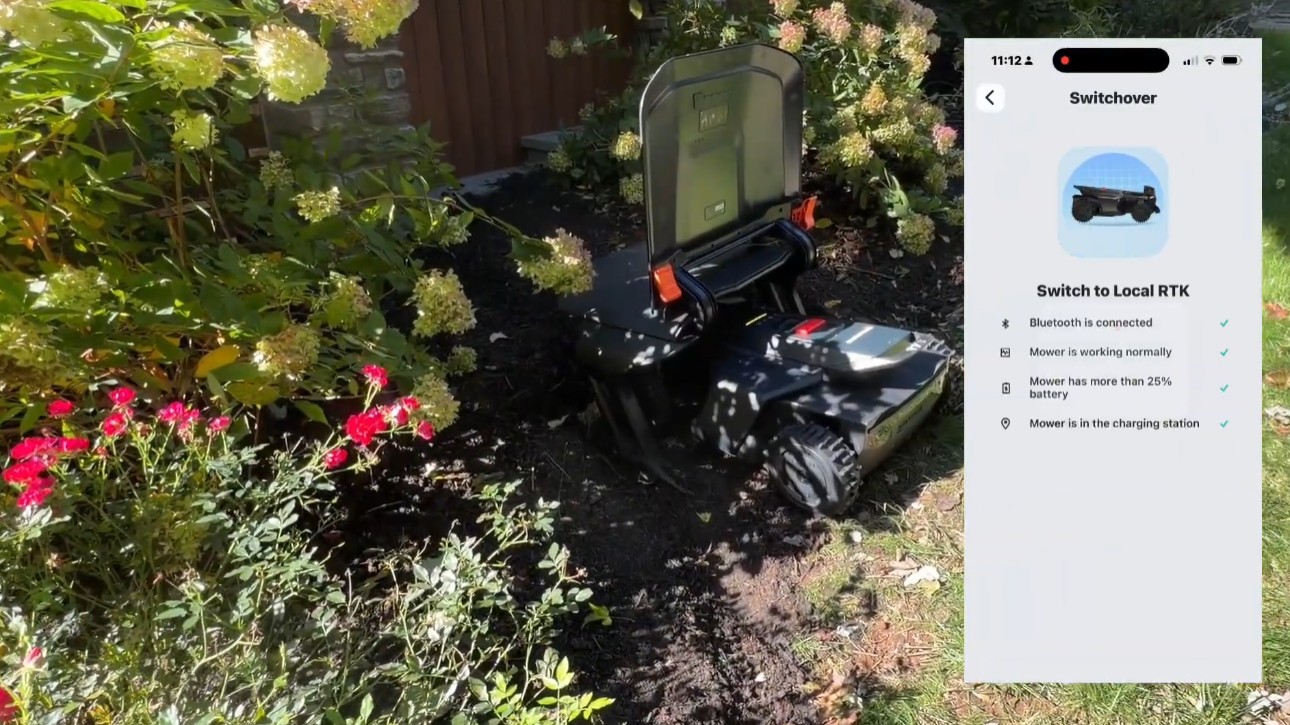
NetRTK would not have worked here. Two bars of AT&T is not a connection you want your mower’s positioning riding on. The step-by-step is in how to switch a Navimow to local RTK, and the difference between the two correction paths is in NetRTK vs local RTK on a Navimow.
Tip 3: Use VisionFence-off zones to fine-tune the camera
The X430 pairs RTK with a camera system (three cameras and a 3D sensor, looking almost all the way around it) that spots obstacles and lawn edges. Most of the time that’s a big help. It can see anything about 3 inches tall or higher, so a little outdoor outlet box doesn’t need a no-go zone: the camera sees it, the mower steers around it and takes a picture of it, and the bumper is there if it doesn’t. (What does need a no-go zone is its own post.)
In some spots, though, the camera is too cautious. A low bush hanging over the lawn tells the camera “don’t go here,” so the grass under it never gets cut. You have two choices: trim the bush back so the mower can get under it, or, if it’s a big hedge, draw a VisionFence-off zone over that spot. Inside the zone the mower ignores the camera and trusts the RTK map, so it drives through.
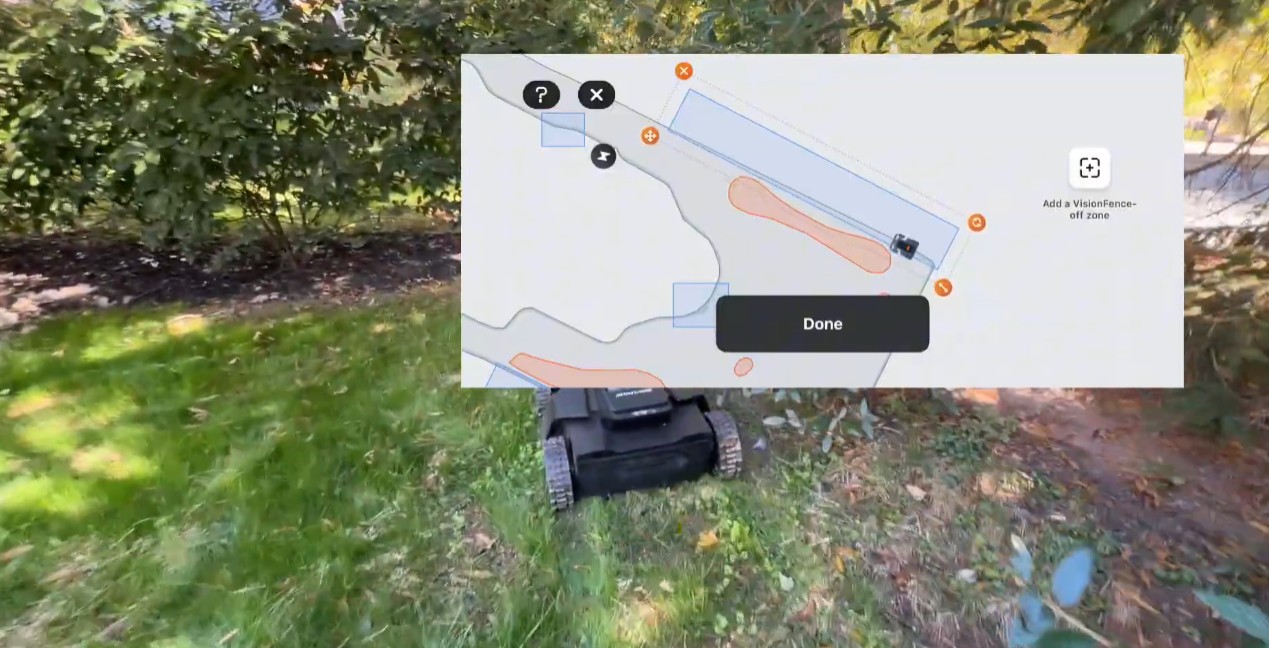
Test it. With the camera off, the mower will also run into the outdoor boxes and posts it would otherwise have seen. I had a customer in Delaware where we turned the camera off along a fence and the mower got beautifully close to it. On another fence at the same house, it just kept hitting the fence over and over. Sometimes you have to adjust the perimeter lines to make it work. That’s the kind of fine-tuning we do for customers with the more detailed mapping features, and it’s why you watch the mower, not the app, after any change.
Watch the light while you test. Blue means positioning is good. Yellow means the mower has lost its RTK or cellular signal and gone past where it can get a good fix. White means the camera has seen something. What every Navimow light color means has the full table.
Tip 4: Don’t cross the driveway
The shortest route between the front lawn and the side yard on this property ran straight across the driveway. It’s tempting. The Navimow can cross hard surfaces, and the app will happily route a channel over asphalt. But a driveway is where cars are, and this mower is black on a black driveway. It’s hard to see. A mower parked on it mid-route, or crossing as someone backs out, is a mower that gets run over.
So I capped the boundary at the driveway and went out of my way: a channel around the back of the house connects the zones instead. It adds a little travel time, and the Navimow figures all of that into its schedule. The mower never has to share space with a car.
Two more things we do on every install: reflective stickers on the mower, so headlights pick it up at dusk, and the name tag. When you plan your own map, look for the route that keeps the mower safe, not the shortest one. It’s on our list of things never to do with a robot mower for a reason.
Tip 5: Map no-go zones clockwise and boundaries counterclockwise
This lawn has more than a dozen no-go zones: flower beds, trees, shrubs and landscape features scattered across a 0.33-acre yard. With that many, mapping technique matters, and so does planning.
The trick I use on every install:
- No-go zones (Navimow calls them no-boundary islands): drive clockwise. Drive the mower around the obstacle in a clockwise direction.
- Mowing boundaries: drive counterclockwise. Drive the perimeter of the areas you want mowed in a counterclockwise direction.
- Get the edges right. The cutting discs sit under the body of the mower, not at its edge. Along pavement, put one wheel on the hard surface. Along a bed, put one wheel 2 or 3 inches into the mulch. That puts the discs directly over the last of the grass.
Sticking to a consistent direction keeps the mapping predictable and gives you cleaner edges around each obstacle. After mapping, watch the mower run a perimeter lap on every single zone. It gets smarter over time, because the camera system (Navimow calls it V-SLAM, visual simultaneous localization and mapping) keeps learning the lawn, but the first laps are where you catch a no-go zone that’s too tight or a corner it won’t enter. More of what we’ve learned is in robot mower mapping tips.
Plan before you’re standing on the lawn. Mapping a dozen no-go zones takes real time. You can plan your whole map for free on our satellite tool first: boundary, zones, channels and the no-go candidates, so the time on site goes into driving the mower, not deciding.
The short version
- Put the power supply in a weatherproof enclosure. Protected all season, and it comes inside in one step for winter. The buried cable stays out with its caps closed.
- Mount the RTK antenna above the roofline on a color-matched wall mount. About 120 degrees of sky, a 600-foot rated reach (half of that through trees), and then switch the mower to the local antenna in the app.
- Use VisionFence-off zones where the camera is too cautious, and test them, because the camera is off there.
- Don’t cross the driveway. Cap the boundary, route a channel around, and put reflective stickers on the mower.
- Map no-go zones clockwise and boundaries counterclockwise, one wheel over the edge, then watch the first perimeter lap of every zone.
There’s a lot to these mowers, and they can be tuned until the lawn truly takes care of itself. Everything I’ve learned doing it is in The Robotic Lawn Mower Owner’s Handbook, free as a PDF or in paperback on Amazon.
Get a professional Navimow install
A robotic mower is only as good as its install. A protected power supply, an antenna that can see the sky, smart use of the camera, a safe route and a clean map are the difference between a mower that runs itself and one you keep rescuing.
Zippy Lawnz is an authorized dealer and service center for Segway Navimow, Mammotion, Yarbo and Lopkin, serving Pennsylvania, New Jersey, Maryland, Delaware, Virginia and Colorado. Every install includes mapping, training and an on-site test of the finished map.
- 📍 Map your lawn — free
- ✉️ Email: [email protected]
- 📞 Call or Text Us: 410-725-7500
Watch the full video on YouTube: 5 Navimow Install Tips Every Owner Should Know (From a Dealer). And tell us what you named your mower: we’ve had a Mufasa, an Edward Scissorhands, a Morpheus and a Getmo so far.
Frequently asked
Should a Navimow power supply go in an enclosure?
We put it in one on every install we can. An outdoor enclosure box next to the house, with the cables running through sealed grommets, keeps rain, mulch, sprinklers and string trimmers off the power supply all season. It also makes winterizing easy: unclip the lid, unplug, and carry the power supply inside. The buried extension cable stays outside with its weatherproof caps closed. Nothing to unscrew or dig up.
Where should I mount a Navimow RTK antenna?
Above the roofline, where it gets about 120 degrees of open sky, and out of the mower's path. On a house surrounded by trees that means a wall mount on the fascia, high enough that the antenna head clears the lip of the roof. We use a white mount on light trim and a black one on a dark house, and the cable runs down the wall and underground to the charging station. A pole in the middle of the yard works, but it's an eyesore and one more thing to mow around.
How far does the Navimow RTK antenna reach through trees?
Navimow rates each antenna for about a 200-meter radius, roughly 600 feet, with a clear line of sight. Through trees, plan on about half that. The link is a 900 MHz-band radio, which gets through foliage far better than a Wi-Fi signal would. On our Phoenixville install the far side of the lawn sits about 75 feet from the antenna through a line of trees, and the mower's light stays blue there, which means the correction is holding.
Why is my Navimow's light yellow?
Yellow means the mower has lost its positioning signal: it's outside what the RTK antenna or the cellular connection can deliver. Blue means everything is good. On a Navimow that has just been installed, the usual causes are an antenna mounted too low, an antenna that was never switched on in the app (the mower ships on NetRTK), or a corner that's simply too far from the antenna through too many trees.
What is a VisionFence-off zone on a Navimow?
An area where the mower turns off the camera it uses for obstacle avoidance and trusts the RTK map instead. The X430's cameras usually help, but a low bush, a shadow line or a mulch edge can make the mower turn back early and leave grass under it. A VisionFence-off zone over that spot lets it drive through. Test it, though: with the camera off, the mower will also drive into the outdoor outlet or fence post it would otherwise have seen.
Do I need a no-go zone around an outdoor outlet or a hose reel?
No. The Navimow's cameras see anything about 3 inches tall or higher, and an outdoor outlet box is 6 to 8 inches off the ground. The mower spots it, steers around it and takes a picture of it. Save your no-go zones for the things the cameras can't see or that you can't afford to test: sprinkler heads, flower beds, exposed roots, ponds, pools and the driveway.
Should a robot mower cross the driveway?
Avoid it when you can. A Navimow can cross hard surfaces, but a driveway is where cars are, and a black mower on black asphalt is hard to see. A mower parked on it mid-route or crossing as someone backs out is a mower that gets run over. On our Phoenixville install we capped the boundary at the driveway and mapped a channel around the back of the house instead. It adds a little travel time, and the mower never shares space with a car. We also put reflective stickers on every mower we install.
Which direction should I drive the mower when mapping no-go zones?
The method we use on every install: drive around each no-go zone clockwise, and drive the mowing boundaries counterclockwise. Sticking to a consistent direction keeps the mapping predictable and gives cleaner edges around each obstacle. Then watch the mower run its first perimeter lap on every zone and adjust any zone that cuts too close or leaves grass behind.
Keep reading
Installation & SetupHow to Switch a Navimow to Local RTK (It Ships on NetRTK)Every Navimow arrives on NetRTK, and the antenna stays in the box. How to mount it, pair it, switch over in the app, and tell from the light that it worked.Installation & SetupWhat Needs a No-Go Zone on a Navimow? The 3-Inch RuleA Navimow's cameras see anything about 3 inches tall, so an outlet needs no no-go zone. What does, how to drive when you map one, and when to turn the camera off. Tips & MaintenanceNavimow Light Colors: What Blue, Yellow, White and Red MeanBlue is a solid fix, pulsing yellow is weak satellite or RTK signal, white means the cameras saw something. Every Navimow light color and what to do about each.
Explore the system
The mowers and pages behind this topic — see them sized to your yard.