
NetRTK vs Local RTK on a Navimow: Which Should You Run?

Here’s a fact that surprises most Navimow owners: the RTK base antenna that came in the box is probably still in the box — and the mower mows fine anyway. That’s because every Navimow can get its centimeter-level corrections two different ways, and out of the box it defaults to the one that needs no hardware at all: NetRTK, corrections delivered over the internet.
Both paths work. But they fail differently, they behave differently under stress, and which one your yard should run is a real decision — one most owners never knew they were making. This is the full breakdown: how each path works, why the base station’s direct radio link is the lower-latency option, and how to tell which mode your property actually needs.
What do RTK corrections actually do?
The short version: plain satellite GPS is accurate to a few meters, which is useless for holding a mowing line. RTK (Real-Time Kinematic) positioning adds a correction signal from a reference receiver in a precisely known location. By comparing what the reference measures against what it knows, the system cancels out atmospheric error and pins the mower down to centimeters. (The full physics, with live visuals, is in our flagship explainer.)
The part that matters for this article: the mower needs a continuous feed of those corrections, and corrections are perishable. Each one describes the atmosphere right now — within seconds it’s stale, and the fix starts to loosen. So the question that decides your mower’s day-to-day behavior isn’t “does it have RTK?” It’s “what path do the corrections take to reach it — and how fresh are they when they arrive?”
Path 1 — NetRTK: corrections over the internet (the default)
With NetRTK, your mower never talks to a base station on your property. Corrections come from a network of reference stations operated regionally, get packaged by a correction service, and travel to the mower over the internet — riding the mower’s built-in cellular connection, or WiFi if you’ve connected it.
The appeal is obvious, and it’s exactly why Segway ships this as the default: zero setup. No antenna to mount, no placement rules, nothing to power. Unbox, map, mow. On a property with strong cellular, NetRTK is genuinely good — centimeter-class fixes, no hardware on the lawn.
The catch is the fine print you just read: on a property with strong cellular. Every correction now depends on a chain of infrastructure between a reference station and your backyard — and your mower’s positioning inherits the weakest link in that chain.
Path 2 — Local RTK: the base station in the box
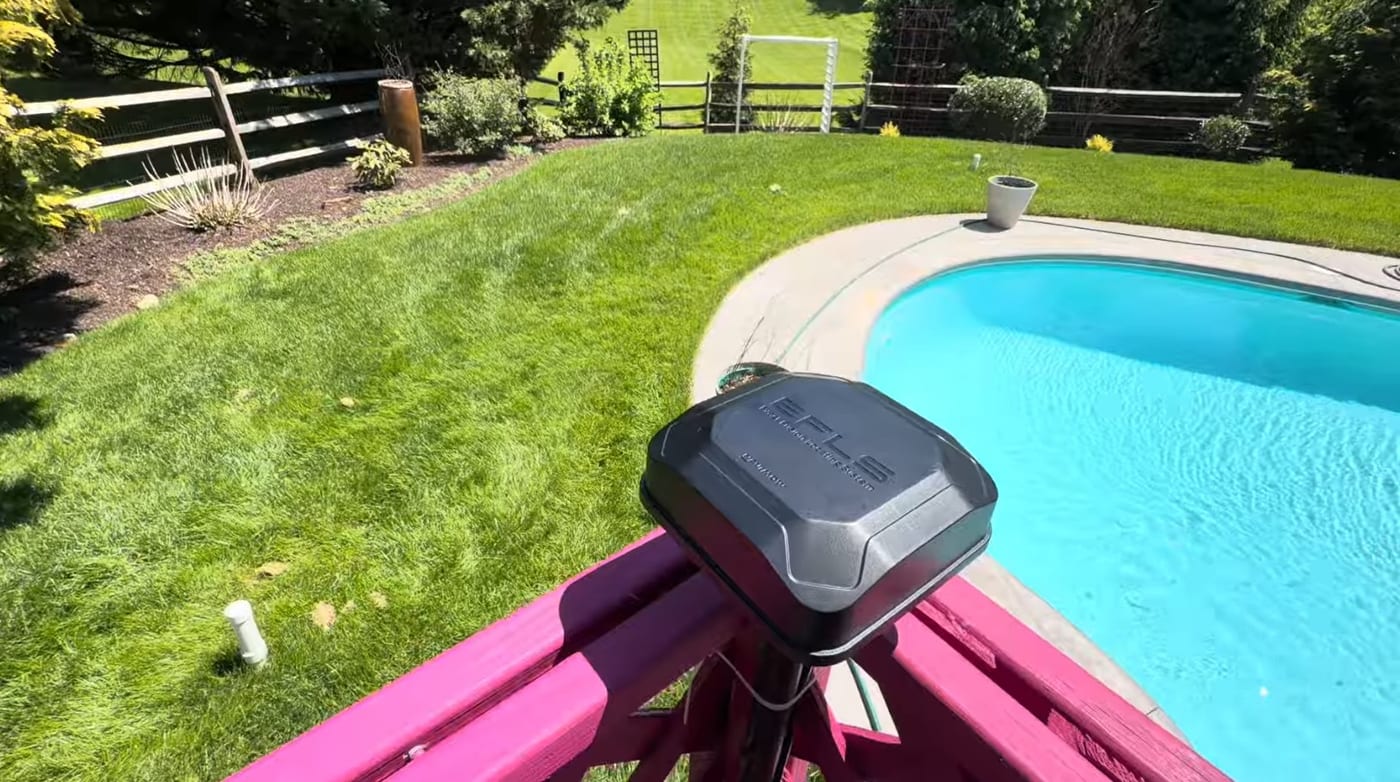
Local RTK is the antenna: a fixed reference receiver mounted on your property with open sky above it. It watches the same satellites the mower does, computes the correction for your exact patch of atmosphere, and broadcasts it straight to the mower over a dedicated low-frequency radio link — a license-free band far below WiFi’s 2.4 GHz, the kind of frequency that carries farther and pushes through foliage better at the same power.
Note what’s not in that sentence: the internet. Once the base is up, the positioning loop is entirely on your property. Cellular can drop to zero bars and the mower’s fix doesn’t flinch. In our real-world range test, that direct link held to about 600 feet with clear line of sight — and where a property genuinely outruns one base, a second antenna extends the coverage.
Why is the direct radio link lower latency?
Count the hops.
A NetRTK correction crosses four links, and each adds its own delay and its own failure mode: server load at the correction service, internet routing, congestion at the cell tower, one bar of LTE at the back fence. None of those is usually fatal — but corrections age in seconds, so every bit of delay and jitter arrives as a slightly looser, slightly more nervous fix. And when the data link hiccups entirely, the mower coasts on stale corrections until it degrades — wavering lines, hesitation, an eventual positioning stop.
The base station’s link is one hop, a few hundred feet long, on a radio band it has to itself. Corrections arrive in milliseconds, every time, in weather, in dead zones, at the far corner of the property. There’s also a subtler advantage: a NetRTK reference station might be miles from your lawn, so its atmospheric picture is an approximation of yours. The base in your yard measures the exact sky your mower is under. Shorter baseline, fresher data, dedicated link — that’s why Local RTK is the steadier fix.
NetRTK vs Local RTK: the honest comparison
| 📶 NetRTK (default) | 📍 Local RTK (base station) | |
|---|---|---|
| Hardware to install | None | The antenna in the box, mounted right |
| How corrections travel | Reference network → internet → cellular/WiFi → mower | Base → mower, direct sub-GHz radio |
| Correction latency | Varies with network conditions | Milliseconds, consistent |
| Reference distance | A regional station, possibly miles away | Your yard |
| Weak cellular | The classic failure mode | Doesn’t matter for positioning |
| Coverage limit | Wherever your data coverage holds | ~600 ft per antenna, extendable |
| Setup effort | Zero | Placement rules matter — sky, height, rigidity |
Neither column is “the good one.” NetRTK on strong coverage is a clean, hardware-free experience. Local RTK is the steadier instrument. The right answer is a property question, not a preference question.
Which one should your yard run?
Here’s how we actually decide it on installs:
- Strong cellular across the whole lawn, modest property? NetRTK is honestly fine. Don’t add hardware to solve a problem you don’t have.
- Cellular is weak, spotty, or one-bar-on-a-good-day? Run the base station. This is the single most common reason we switch a customer to Local RTK — and if you’d rather stay on NetRTK, strong 2.4 GHz WiFi over the lawn can carry the corrections instead.
- Large or spread-out property? Local RTK, planned: antenna placed by the 4 rules, coverage circles drawn, and a second antenna where the lawn runs past 600 feet.
- The mower goes yellow in the same spots either way? Now it matters which mode you’re in. On Local RTK, same-spot yellow is the edge of the base’s radio coverage. On NetRTK, it’s a cellular dead zone. Same symptom, opposite fixes — which is exactly why the diagnosis comes first.
- Heavy canopy blocking the sky itself? No correction path fixes that — both modes still need the mower to see satellites. That’s LiDAR territory.
And you don’t have to guess about your own property: our free lawn check measures the RTK sky view zone by zone and gives you a cellular estimate for the address — clearly labeled as an estimate, because signal is one of the things we confirm on site before any install. That’s both halves of this article, read from satellite, in about two minutes.
Not sure which mode you’re on?
That’s the most common version of this conversation, and it takes five minutes to settle. Zippy Lawnz is an authorized dealer and service center for Segway Navimow, Mammotion, and Yarbo, with nationwide sales and remote support and hands-on installs across Pennsylvania, New Jersey, Maryland, Delaware, Virginia, and Colorado. Choosing the correction path — and building the antenna install when Local RTK wins — is a standard part of how we set up every property.
- 📍 Check my lawn — free — per-zone sky view and a cellular estimate for your address, measured in about two minutes.
- 🗺️ Book a free site assessment — we’ll read your property’s signal picture and recommend the mode (and the hardware, if any) it actually needs.
- 📞 Call or Text Us: 410-725-7500
The short version: default out of the box = NetRTK over the internet · the antenna in the box = Local RTK, one direct sub-GHz radio hop · corrections go stale in seconds, so fewer hops = steadier fix · ~600 ft per base, second antenna extends · free tool reads sky + cellular per zone
Frequently asked
Is my Navimow using NetRTK or the RTK base station?
Unless you (or your installer) deliberately mounted and paired the base antenna, you're almost certainly on NetRTK — it's the out-of-the-box default because it needs zero hardware. The quickest tell: if the antenna that came in the box is still in the box, your mower has been pulling corrections over the internet the whole time. You can confirm in the positioning section of the Navimow app.
Why does the local base station have lower latency than NetRTK?
Because of the path the correction takes. RTK corrections are perishable — they describe the atmosphere right now, and they go stale within seconds. A NetRTK correction hops from a reference station through a correction service, across the internet, and down your cellular or WiFi link before reaching the mower; every hop adds delay and jitter, and a weak link anywhere drops it. The base station broadcasts the same correction in a single hop over its own dedicated low-frequency radio — milliseconds, consistently, with no internet in the loop.
Is Local RTK more accurate than NetRTK?
Both deliver centimeter-class positioning when everything is healthy. The base station's edge is consistency: its reference point is in your yard rather than a station miles away, so the atmospheric correction matches your lawn exactly, and its direct radio link doesn't stutter when the cell network does. In practice that means a tighter, steadier fix — and it keeps working in cellular dead zones where NetRTK falls apart.
Do I need internet for Local RTK?
Not for positioning — the correction link between base and mower is its own radio and never touches the internet. The mower still uses cellular or WiFi for everything else: app control, schedules, notifications and firmware updates. So a base station takes the fix off the network's shoulders, but a healthy data link is still worth having for the app experience.
Which mode should a large property run?
Usually Local RTK — but planned. One base covers roughly 600 feet of radius in the real world, so a large property needs the antenna placed deliberately, and past that radius a second antenna (Navimow's Signal Enhancement Antenna) extends coverage. NetRTK has no distance limit from a base, but every acre still has to sit under dependable cellular or WiFi, which large rural properties often can't promise.
Keep reading
 Installation & SetupWhere to Install Your Robot Mower's RTK Antenna (4 Rules)Mount your robot mower's RTK antenna wrong and it drifts after a season. The 4 rules of RTK placement — open sky, height, rigid mounting, and reflective surfaces.
 Installation & SetupNavimow Signal Enhancement Antenna: Do You Need a Second RTK Unit?Navimow mows the front fine but goes yellow out back? That's the edge of RTK range. When a second antenna is the fix, where to mount it, and what it costs.
 Customer InstallsHow Far Does Navimow RTK Reach Through Trees? A Paoli, PA InstallWe tested Navimow RTK range with clear line of sight and through trees, mounted a charging station on a brick patio with concrete anchors, and set up VisionFence.
Explore the system
The mowers and pages behind this topic — see them sized to your yard.