Will a Robot Mower Work on Your Lawn? This Free App Tells You

“Will a robot mower actually work on my lawn?” It’s the question I get more than any other, and until now the honest answer was usually “send us some pictures and we’ll take a look.” So we built the tools into our app. It’s free on iPhone and Android, and it lets you check your own yard before you spend a dollar.
I’m standing in front of our Lawn Care Automation store in Easton, Maryland. This is where we repair robot mowers and run technical support, and the app puts you in touch with the same people. Here are the things I showed in the video above.
1. Measure your slope with your phone
Slopes are the first thing that decides which robot mower will work. Every mower has its own slope rating, and the only way to know if yours fits is to know how steep your lawn really is. Your phone can tell you.
Open the Slope Meter on your phone and:
- Walk to the steepest part of the lawn the mower will actually cross.
- Lay the phone flat on the grass, screen up, and tap Start measuring.
- Hold still for two seconds. It beeps and locks the reading.
- Turn the phone end for end on the same spot and measure again.
I always say measure twice, cut once. The phone sits on its camera bump, which tips it a degree or two, and turning it around cancels that out. What you get is the grade as a percent and in degrees, an arrow showing which way is uphill, and a list of which robot mowers are rated for it.
Measure a few spots and keep the steepest one. That’s the number that counts. On bumpy turf, lay the phone on a clipboard or a short board for a truer reading.
You don’t need to download anything for this one: it opens right in your phone’s browser. It’s also coming to the app itself in its next update. On an iPhone, it will ask to use the phone’s motion sensor. Say yes, because that’s how it reads the tilt.
Measure the low spots too
In the video I put the phone in a swale, what most people would call a ditch. It read about 20°, which is roughly a 36% grade. Every robot mower we sell is rated for that, though six of them are close to their limit there.
But steepness isn’t the only thing to know about a ditch. Water collects in a swale after rain, and we’ve had robot mowers end up in it. For a spot like that, I’d set the swale up as its own zone and leave it off the automatic schedule, so the mower only goes in when you send it on a dry day.
When you’re not sure about a spot, text us a picture. The Slope Meter has a button for that, or text it to (844) 445-2969. We’ll tell you which mower fits and how we’d set it up. If you’d like a quick answer first, log in free and try the photo check on the same screen. For more on hills, see do robot mowers work on slopes and the best robot mowers for hills.
2. See the mower in your yard, life-size
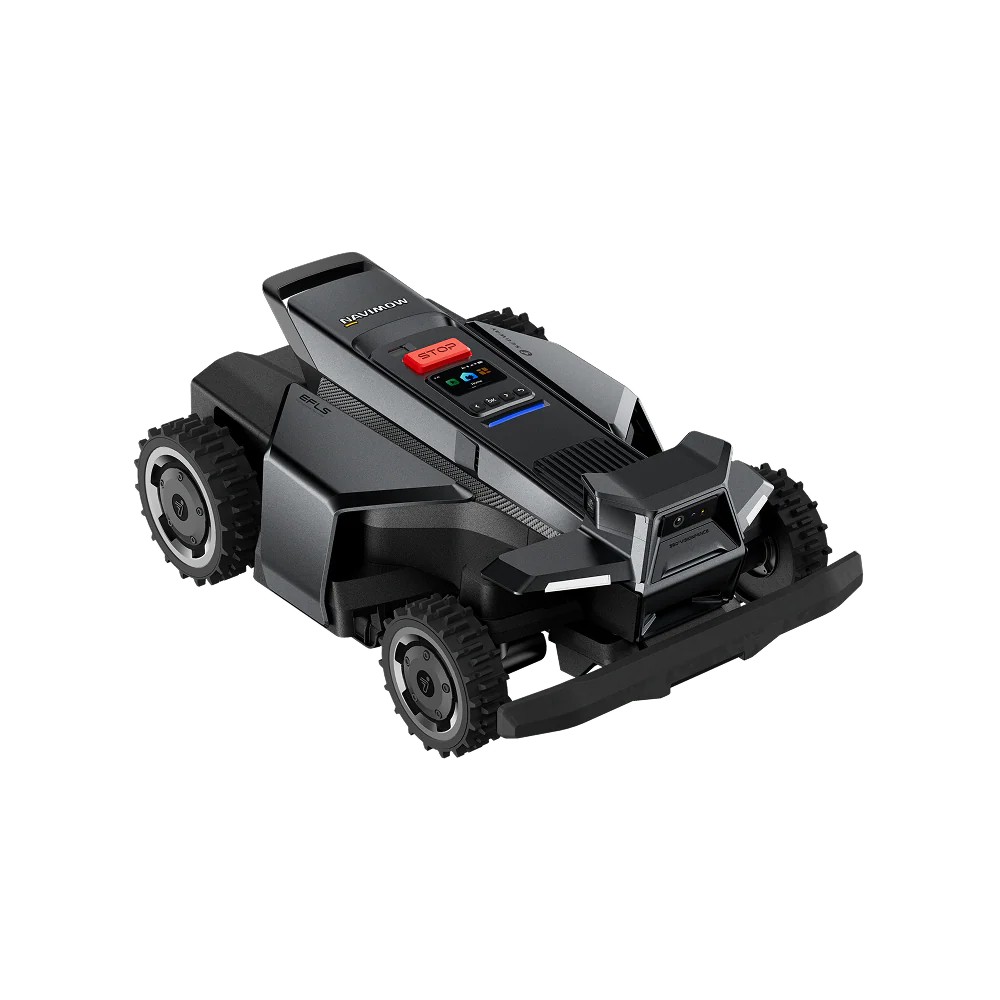
This one is my favorite. Say you want to know if a Segway Navimow X4 will fit in a certain part of your lawn. Open the camera view, point it at the grass, and the mower appears in your yard at real size. Drag it where you’d want it, turn it, and take a picture.
Then show that picture to your spouse, and agree on where the mower goes before anybody shows up to install it. It saves a lot of back and forth on install day.
If you’re having us do the install, send those pictures to us too. Then we know exactly where you want the charging station, and if your mower uses its own RTK antenna, where you’d like that mounted. How to plan your install with your phone walks through what to look for at each spot.
We scanned the real machines ourselves, and the size is locked, so a pinch won’t make the mower look smaller than it is. You’ll find every scanned mower on one page.
3. Help from the people who fix these mowers
Once your mower is in the app, put its serial number in too. Then when you chat with us or call, we already have your lawn, your mower and its serial number in front of us. We handle warranty service for the Segway Navimow, Mammotion, Yarbo and Lopkin mowers we sell, and a warranty claim usually starts with that serial number. Having it on file saves a step when something goes wrong.
You can chat with us right in the app, and you’ll be talking to the same team that installs and repairs these machines every day. For repairs and warranty claims, our support page explains how it works.
4. Live training and a monthly giveaway
On the first Thursday of every month we hold a live training session at 7:30 PM Eastern, 4:30 PM Pacific. Bring your questions and we answer them on air.
We also do a giveaway every month, and you enter right in the app. Each month has its own challenge. For our December 3 session it’s the coolest charging station, so take a picture of yours and send it in. Everybody gets to vote for their favorites, and we pick the winner live.
5. Count your gas savings
I almost forgot this one in the video. The app has a counter for our community’s impact: every robot mower that joins adds up the gas it saves compared to a gas mower. When I filmed this, 96 robot mowers had been added, and together they’d saved more than 2,400 gallons of gas.
You don’t have to buy from Zippy Lawnz to add yours. Any brand counts. Add your mower, and you’ll see your own savings beside everyone’s. The live totals are on our impact page.
Get the app
The Zippy Lawnz app is free on iPhone and Android. It has the owners’ community, the camera view, support, the giveaway and the impact counter, plus your lawn map and report if you’ve mapped your lawn with us.


One thing it doesn’t do is drive your mower. Your mower’s own app does that. Ours is for everything around it: deciding which mower fits, planning the install, and getting help after.
Download it, try the Slope Meter on your steepest spot, and let me know what you think.
Upgrades for this, from our shelf
What each one fixes, what it fits, and how it works. Ranked by what our customers order most.

Fixes: Blade changes take twelve screws and both discs off the mower.
Fits Navimow X430, X450 and Terranox

Fixes: The antenna sits on a ground pole that can't see enough sky, or the trimmer keeps finding it.
Fits Navimow X430, X450 and Terranox antennas

Fixes: Changing a dozen blades and screws takes half a Saturday.
Fits Navimow X430, X450 and Terranox
Want to see the Navimow X4 in your yard right now?
We scanned these mowers ourselves, from the real machines, at real size. Spin one here, or tap “See it in your yard” on your phone and it appears on your lawn, life-size.
📍 It plans your install, too. Place the mower where it will park, take the picture, and send it to our installers or your spouse. How to plan your install with your phone →
It's in our free app too. The camera view, your lawn map and your mower's reminders, free on iPhone and Android.
Frequently asked
Is the Zippy Lawnz app free?
Yes. It's free on iPhone and Android, with no subscription. Measuring a slope and seeing a mower in your yard don't even need an account. A free account is what saves your lawn, your mower and your questions so we can help you faster.
How do I measure the slope of my lawn with my phone?
Open the Slope Meter, lay your phone flat on the steepest part of the lawn the mower will cross, and hold still for two seconds until it beeps. Then turn the phone end for end on the same spot and measure again. The second reading cancels out the camera bump, so you get a truer number. It shows the grade as a percent and in degrees, which way is uphill, and which robot mowers are rated for it.
How steep a slope can a robot mower handle?
It depends on the mower. Each maker publishes a slope rating, and across the mowers we sell they run from 40% (about 22°) up to 84% (about 40°). No robot mower climbs more than about 40°, which is about as steep as a staircase. We like 10% to spare, because wet grass and soft ground ask more of a mower than the rating does.
Should a robot mower mow a ditch or a swale?
Usually not on its schedule. A ditch or swale can hold water after rain, and we've had robot mowers end up in it. We set that area up as its own zone that you run by hand when it's dry, and keep it off the automatic schedule.
Can I see a robot mower in my yard before I buy one?
Yes. The app's camera view puts a life-size mower on your lawn. Drag it where you'd want it, take a picture, and show it to your spouse or send it to us. We scanned the real machines ourselves, and the size is locked, so it takes up the same room on your screen that it would in your yard.
Do I have to buy my mower from Zippy Lawnz to use the app?
No. Owners of any brand, bought anywhere, are welcome in the community and can add their mower to our impact counter. The app doesn't drive your mower, though. Your mower's own app does that.
Keep reading


Explore the system
The mowers and pages behind this topic — see them sized to your yard.