
Mammotion LUBA Blade Replacement: Why I Switched to Titanium
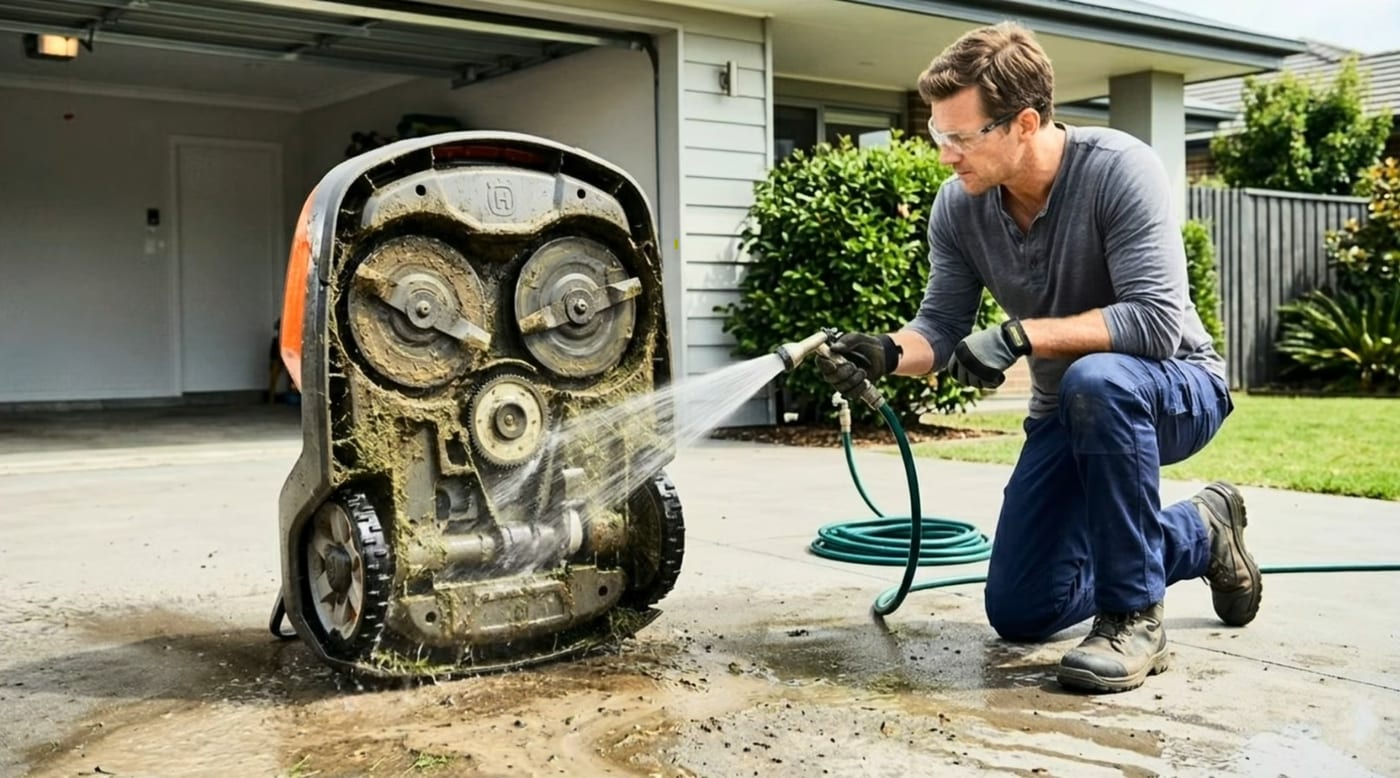
It’s the start of a new mowing season, so I’m replacing the blades on my Mammotion LUBA — and this year I upgraded to titanium-coated, double-sided stainless steel blades. Here’s why they’re worth it, and how the swap goes.
Stock blades wear faster than most owners realize, and a dull blade tears grass instead of cutting it — leaving your lawn looking rough and brown at the tips. The right replacement blade makes a real difference in cut quality, lawn health, and how often you’re back under the deck swapping them out.
Why titanium-coated 420J2 stainless steel
- Sharper, cleaner cuts — precision-ground double-sided edges shear grass cleanly instead of tearing it, which means healthier turf and a more uniform look
- Double-sided design — flip them when one side dulls, doubling effective blade life
- Built to last — titanium coating + 420J2 stainless steel resists wear from continuous cutting, sticks, and rocks
- Rust and corrosion resistant — engineered to hold up against rain, sun, and humidity all season long
- Fewer passes, less stress on the lawn — sharper edges cover more ground per cut and reduce wear on the mower itself
The swap, start to finish
The video walks through the whole job, but here’s the shape of it — this is a ten-minute job with a screwdriver, and nobody should be paying a shop for it:
- Power the mower off completely. Not standby — off. Then gloves. The blades you’re removing may be dull for grass, but they’re plenty sharp for fingers.
- Flip the mower on a soft, stable surface. A table with a towel or mat protects the shell (and your back — don’t do this hunched over the lawn).
- Clean the deck while you’re in there. A season of caked clippings comes off with a plastic scraper or brush. A clean deck cuts better and sheds moisture instead of holding it against the discs.
- Back out the screws on each blade. Each cutting disc holds small free-spinning blades secured by a screw apiece. Remove, and note how the blade sits before you lift it.
- Install the new set (or flip the old one). Blades must spin freely after mounting — that free spin is part of how these decks shrug off impacts. Snug the screws firmly, but don’t over-torque.
- Spin-check each disc by hand, confirm nothing catches, flip the mower back over, and send it out.
Replace as a full set. Mixing one fresh blade with two worn ones unbalances the disc — blades are cheap, wobble isn’t.
When to do this
Our guidance: fresh blades every 4–6 weeks in season — sooner on sandy soil, big lawns, or heavy daily schedules — and let the lawn tell you when you’re overdue: torn, browning grass tips a day after mowing are the classic dull-blade signature.
Want to skip the screwdriver entirely? We stock complete cutting discs with the blades pre-installed — fresh blades, torqued correctly at the shop. Swap the whole disc instead of backing out every screw and the job goes from a half hour to a couple of minutes, saving you 20–30 minutes each change. Ask us.
If you use our My Zippy dashboard, it does the arithmetic for you — it estimates blade hours from your actual mowing schedule, shows a wear meter, and reminds you by email when a change is coming due. Press “Blades changed” after the swap and the clock restarts.
Mammotion service & support
We’re an authorized Mammotion service center serving owners across Pennsylvania, New Jersey, Maryland, Delaware, Virginia, and Colorado. Whether you need help with installation, mapping, RTK setup, blade replacements, firmware troubleshooting, or full repair work — we’ve got you covered.
Need blades, or want us to handle the whole seasonal service? Call or text 410-725-7500 and we’ll sort you out.
Frequently asked
How often should I replace the blades on a Mammotion LUBA?
Our guidance: fresh blades every 4–6 weeks in season. Double-sided blades stretch that — flip them when the first side dulls and you double the effective life. Shorten the interval for sandy soil, big lawns, or heavy daily schedules. The real tell is the lawn itself: grass tips that look torn and brown a day or two after mowing mean the blades are past due.
Why upgrade to titanium-coated blades instead of stock?
Stock blades wear faster than most owners realize. Titanium-coated 420J2 stainless holds a precision-ground edge longer, resists wear from sticks and the occasional rock, and shrugs off rain and humidity without rusting. Sharper edges shear grass cleanly instead of tearing it — healthier turf, a more uniform cut, and fewer trips back under the deck.
What tools do I need to change LUBA blades?
A screwdriver, gloves, and ten minutes. Power the mower off first, flip it on a soft stable surface, back out the small screws holding each blade to the discs, swap (or flip) the blades, and snug the screws back down — firm, not gorilla-tight. Give each disc a spin by hand before sending the mower back out.
Can you flip robot mower blades instead of replacing them?
If they're double-sided, yes — that's half the argument for them. When the working edge dulls, unscrew each blade, flip it to the fresh edge, and reinstall. You replace the set when both edges are done. Single-sided stock blades don't give you that second life.
How do I know my robot mower blades are dull?
Look at the grass, not the blade: torn, frayed tips that brown within a day or two of cutting are the classic sign. A dull blade rips grass instead of shearing it, which stresses the plant and dulls the lawn's color. If your cut quality has faded and your mowing hours are adding up, it's the blades.
Can I buy LUBA cutting discs with the blades already installed?
Yes — we stock complete cutting discs with fresh blades pre-installed and torqued correctly. You swap the whole disc instead of backing out every screw, which saves 20–30 minutes on the job. Call or text 410-725-7500 and ask.
Keep reading
Tips & MaintenanceNavimow Blade Replacement: How Often, How To, and TitaniumHow often to replace Segway Navimow blades (4–6 weeks daily mowing), the new-screws rule everyone breaks, and our honest take on titanium-coated blades. Tips & Maintenance“Titanium” Navimow Blades vs OEM: We Tested Both — OEM WonWe put titanium-coated Navimow blades against OEM — laser edge reader, scale, and a month of mowing. The stock Segway blades won every check. Here's the data.
 Customer InstallsWhy We Installed a Mammotion LUBA 2 in Coatesville, PAThe LUBA 3 is shipping — so why install a LUBA 2 in Coatesville, PA? An honest dealer look at value, LiDAR, stream-safe mapping and under-fence mowing.
Explore the system
The mowers and pages behind this topic — see them sized to your yard.